

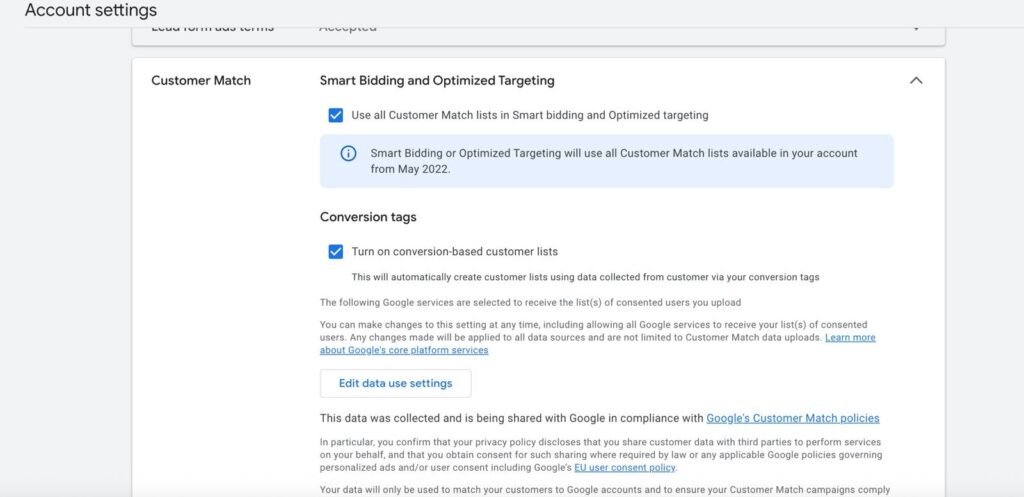
2. Build audience segments
Once Google matches the uploaded data with signed-in Google users, you can:
-
- Retarget past buyers with new offers.
- Exclude existing customers when running acquisition campaigns.
- Create Similar Audiences (lookalikes) to expand reach.
3. Apply in campaigns
-
- Attach these audiences to Search, YouTube, Display, and Discovery campaigns.
Combine with bid adjustments or let Smart Bidding handle it.
- Attach these audiences to Search, YouTube, Display, and Discovery campaigns.
How Google’s Customer Match Algorithm Works with uploaded data
- Google “hashes” the data for security.
- Before uploading, or during upload, the information is encrypted using SHA256 hashing.
- Hashing converts your customer’s personal info into a string of numbers/letters.
- Example: customer@example.com → 5f4dcc3b5aa765d61d8327deb882cf99 (hashed form).
- This way, Google never sees the raw customer data.
- Google compares hashed data with its own
- Google already stores hashed versions of emails, phone numbers, etc., for billions of logged-in users.
- The system cross-checks your uploaded list against its own database of hashed user info.
- When a match is found
- If the hashed email/phone user uploaded matches the hashed data of a logged-in Google account, that user is added to your Customer Match audience.
- If no match is found, that record is discarded.
- After processing, you get an audience list of all matched Google users.
- These people can then be targeted across Google Search, YouTube, Gmail, and Display Network.
- Updating & refreshing
- Google recommends uploading updated lists regularly. This keeps your Customer Match audience aligned with your real customer base.
 Why this matters for bidding:
Customer Match feeds Smart Bidding with audience signals. Google knows these matched users are more valuable, so your bidding strategy can prioritize them automatically.
2. Enhanced Conversions: Feeding More Accurate Conversion Data
Conversions are the signals that Smart Bidding optimizes towards. But if tracking isn’t complete, Smart Bidding is running blind. That’s where Enhanced Conversions comes in.
How to set it up:
- Enable Enhanced Conversions in Google Ads → Conversions → Settings.
- Pass hashed customer data (email, phone, name/address) through your website tags or Google Tag Manager.
- Google uses this data to match conversions more accurately to your ad clicks.
Example:
A user clicks your ad → browses → purchases later via another device. Normally, this may not be attributed. But with Enhanced Conversions, the system uses hashed first-party data (like their email at checkout) to connect the dots and give credit.
Why this matters for bidding:
Enhanced Conversions ensure every possible conversion is tracked and attributed, making Smart Bidding smarter. Instead of missing half the picture, your bidding models are trained on complete and precise data.
3. Smart Bidding: Letting Google Optimize With Better Signals
Smart Bidding strategies like Target CPA, Target ROAS, and Maximize Conversions thrive when they receive rich signals.
Here’s how first-party data plays a role:
- Customer Match audiences → Tell Smart Bidding who is valuable.
- Enhanced Conversions → Tell Smart Bidding what actions really happened.
Together, they supercharge Google’s machine learning.
Practical ways to use first-party data with Smart Bidding:
- Prioritize high-value segments
Example: Apply Customer Match lists of loyal buyers. Smart Bidding learns these users have higher conversion probability, so it will bid more aggressively when they search again. - Refine conversion value for ROAS
If you’re running Target ROAS, Enhanced Conversions help ensure higher-value sales aren’t undercounted, letting the bidding system allocate budget more efficiently. - Improve lead quality in CPA campaigns
For lead gen businesses, Enhanced Conversions for leads (with CRM data) can connect offline sales back to Google Ads clicks. This helps Smart Bidding optimize not just for “form fills,” but for real revenue-generating customers.
Example Workflow Putting It All Together
Let’s imagine an e-commerce brand selling organic spices:
- Customer Match
- Upload past buyers → Target them with new festive offers.
- Exclude them from generic awareness campaigns.
- Enhanced Conversions
- Pass customer emails from checkout to Google Ads → Track even cross-device purchases.
- Smart Bidding
- Run a Target ROAS campaign.
- The system learns from accurate sales data (Enhanced Conversions) + high-value buyers (Customer Match).
- The budget is automatically directed to the best customers at the best bids.
Result will be: More sales at a better ROI, with less wasted spend.
Final Takeaway
By using first-party data in Customer Match and Enhanced Conversions, you give Smart Bidding the right signals to work smarter. Customer Match helps you focus on the most valuable audiences, Enhanced Conversions ensures accurate tracking, and Smart Bidding uses both to optimize your bids automatically. Together, they create a powerful system that drives better results and maximizes your ad spend.
- Customer Match = Identify and prioritize valuable audiences.
- Enhanced Conversions = Capture every conversion signal.
- Smart Bidding = Optimize bids with Google’s machine learning.
The key is not just having first-party data—but using it in the right places inside Google Ads. Do this well, and you’ll give Smart Bidding the best chance to work at full power.