
Why Comparing Meta vs. Google Performance Is Misleading for Online Casinos

Online Casino Marketing
📅 May 2, 2026⏱ 5 min read🎰 Casino Marketing Strategy
Comparing Google ROAS to Meta ROAS is like comparing your sportsbook cashier to your slot machine lobby banner. One closes the deal — the other creates the desire in the first place. Judging them by the same yardstick will always lead to the wrong budget cuts.
1

Different Funnel Roles

Google Ads

Intent-based, demand capture — reaches players actively searching for a casino right now.

Meta Ads

Passive discovery, demand creation — reaches players before they even know they want to play.

💡 Meta plants the seed. Google harvests it. You NEED both — don’t make one the scapegoat.
2

Attribution Windows Are Rigged

Google

90-day click, 30-day view
Long conversion window = more attributed conversions.

Meta

7-day click, 1-day view
Short window = fewer credited conversions.

💡 Meta loses out on delayed sign-ups and first deposits — even when Meta drove them.
3

iOS 14 Killed Meta’s Visibility

  • 28-day attribution window? Gone.
  • Postback delays and significantly reduced data granularity.
  • Your casino campaigns might be driving registrations — Meta just can’t fully see them.
💡 Your ads might be performing brilliantly behind the scenes. Apple’s privacy changes are hiding the data.
4

Attribution Bias Is Real

  • Meta drives the first click — awareness, curiosity, intent.
  • Google gets the last click (and takes all the credit).
  • Your budget decisions are based on incomplete player journey data.
💡 Last-click attribution will always favour Google — that doesn’t mean Meta isn’t doing the heavy lifting upstream.
5

Ad Experiences Work Differently

Meta

Storytelling & repetition
Brand awareness, bonus offers, lifestyle content. Builds trust over time.

Google

Instant response
Player intent, direct offer capture. Converts fast.

💡 Different goals, different clocks — judge them accordingly.
⭐ Key Advantage

Meta Allows Casino Remarketing — Google Does Not

This is one of the most important — and most overlooked — differences for online casino operators:

Meta (Facebook & Instagram) — ALLOWS remarketing

Meta permits remarketing to existing casino players and website visitors — even in the gambling niche — with proper certification and geo-targeting compliance.

🚫
Google Ads — DOES NOT allow remarketing

Google’s policy prohibits the use of remarketing lists for casino and gambling advertisers. You cannot retarget users who visited your casino site or app via Google Ads.

What this means for your strategy
  • Meta is your only paid channel for retargeting lapsed players and re-engaging past depositors.
  • Personalised bonus offers to known users can only be delivered via Meta.
  • Google can only be used for top-of-funnel acquisition — new players searching for casinos.
  • Ignoring Meta’s remarketing capability means leaving your highest-value audience unreached on paid social.
  • Don’t let attribution bias make you cut the only channel that can talk to your existing players.

📊 Smarter Metrics to Use Instead

MER
Media Efficiency Ratio — Total revenue vs. total ad spend across all channels. See the full picture, not just last-click.
CAC
Customer Acquisition Cost (blended) — What does it truly cost to acquire a depositing player across all channels combined?
MTA
First-party attribution — Use GA4, Server-Side Tagging / CAPI, and Multi-touch Attribution tools to understand how players truly find you.

Direct comparison between Google Ads and Meta Ads for online casinos is often misleading — and it’s hurting your acquisition strategy.

Each platform plays a fundamentally different role in the player journey. Measure them that way.

Let’s fix this broken comparison model — together. 🎯

Running Paid Traffic for Gray-Area Casino Brands: Strategy, Risks, and Reality

Introduction

The online casino and iGaming industry is one of the most lucrative yet challenging spaces for digital marketers. While the potential customer lifetime value is high, advertising restrictions across major platforms make paid traffic acquisition difficult—especially for gray-area casino brands.

In this article, we explore how experienced advertisers navigate these challenges, from content separation and traffic filtering to risk management and compliance strategies.

⚠️ This content is for educational and strategic discussion only. Advertising regulations vary by country and platform.


Understanding the Gray Casino Advertising Landscape

A gray casino is an operator that:

  • Holds a valid license in one or more jurisdictions
  • Operates legally in specific regions
  • Faces platform-level restrictions rather than outright legal bans

Major ad platforms prioritize:

  • User safety
  • Regional compliance
  • Advertiser transparency

Common challenges gray casinos face include:

  • Ad disapprovals
  • Account suspensions
  • Limited reach and scaling issues

Even licensed operators often encounter these hurdles, making strategic planning essential before running paid campaigns.


Why Traditional Paid Ads Often Fail for Casinos

Most mainstream ad platforms require:

  • Clear disclosure of gambling intent
  • Valid licenses for each target country
  • Landing pages with approved structures

Typical reasons campaigns fail:

  • Landing pages that push wagering too early
  • Misalignment between ad messaging and landing content
  • Traffic from restricted geographies
  • Automated systems flagging casino-related keywords or flows

Because of these restrictions, many campaigns fail before any performance metrics can be measured.


Content Separation: A Strategic Approach

Content separation is a key concept in high-level performance marketing. It involves tailoring content based on audience intent:

  • Informational/neutral content for general audiences
  • Transactional/offer-driven content for qualified users
  • Strong traffic analysis to understand engagement patterns

This strategy is widely used across regulated industries like:

  • Finance
  • Crypto
  • Supplements
  • Dating
  • Regulated SaaS products

By separating content, marketers can guide users more effectively while reducing compliance risks.


Traffic Quality Matters More Than Volume

In gray-area verticals, not all traffic is created equal. Experienced advertisers prioritize:

  • Device type
  • Network quality
  • Behavioral signals
  • Source consistency

Risks of low-quality traffic:

  • Triggering platform reviews
  • Wasting ad spend
  • Lower conversion rates
  • Increased account risk

Focusing on high-intent traffic—even at lower volume—leads to:

  • Better retention
  • Higher lifetime value (LTV)
  • Fewer compliance issues

Risk Management Is a Core Skill

Paid traffic for gray casinos is as much about risk control as it is about creatives or bidding. Professional marketers plan for:

  • Account loss scenarios
  • Domain rotation
  • Payment redundancy
  • Data isolation
  • Measured testing cycles

Entering this space without a clear understanding of risk exposure often results in lost time and capital.


Compliance vs. Performance: A Constant Trade-Off

There is a continuous tension between platform compliance and business growth goals.

Top operators focus on:

  • Staying as compliant as possible
  • Reducing unnecessary signals
  • Avoiding aggressive short-term tactics
  • Prioritizing sustainable, long-term growth

The most successful campaigns are planned in months and quarters, not days, emphasizing consistency over immediate wins.


Final Thoughts: Strategy First, Tactics Second

Gray-area casino advertising is not beginner-friendly. Before launching paid campaigns, brands and affiliates should ask:

  • Do we understand regional regulations?
  • Is our funnel structured for user intent?
  • Are we prepared for enforcement actions?
  • Do we have fallback plans?

When handled professionally, casino advertising can be highly profitable. Handled carelessly, it can quickly become costly and unstable.


If you’re a gray-area casino brand looking to navigate paid traffic safely and strategically, our team can help you build compliant, high-performing campaigns. Contact us today to learn more.

Google Ads for Casino Businesses: Best Strategies to Increase Player Acquisition

Marketing a casino—whether online or land-based—is highly competitive, especially with strict advertising policies across platforms. Google Ads for casino businesses offers one of the most powerful ways to reach high-intent players searching for gaming, betting, and entertainment experiences.

However, to succeed with Google’s strict regulations and rising CPCs, you need a well-planned casino Google Ads strategy that balances compliance, targeting, and performance optimization.

In this blog, we break down the most effective Google Ads tactics to help casinos attract quality players at scale.


🎰 Why Google Ads Are Essential for Casino Player Acquisition

Google remains the #1 platform for players actively searching for casino-related keywords—such as “best online casino,” “live dealer games,” “casino app download,” etc.

Benefits of Google Ads for casino businesses

  • Target players already searching with high buying intent
  • Reach global audiences (within allowed jurisdictions)
  • Use location, device, and demographic filters to refine your reach
  • Run compliant campaigns that generate long-term ROI
  • Analyze performance deeply with keyword data and conversion tracking

A strategic setup ensures your ads are not only approved but deliver consistent players.


⚠️ Google Policies for Casino Ads (What You MUST Know First)

Before running any campaign, ensure:

✔ You have Google’s Gambling & Games Certification

Casinos must be approved by Google to run ads in permitted locations. You must:

  • Provide local operating licenses
  • Target only allowed countries
  • Avoid minors and sensitive terms in creatives

✔ Types of casino ads allowed

  • Online casino (in approved regions)
  • Sports betting
  • Poker
  • Lottery
  • Fantasy sports (in most countries)

Making your campaign compliant is the foundation of a successful casino Google Ads strategy.


🔥 Best Google Ads Strategies to Increase Casino Player Acquisition

1. Target High-Intent Search Keywords

Keywords are everything in casino marketing. Focus on high-commercial-intent terms such as:

  • “best online casino bonus”
  • “live casino games online”
  • “real money casino apps”
  • “instant withdrawal casinos”
  • “casino signup bonus”

These users are already close to conversion.

Pro Tip

Use a mix of Broad Match + Smart Bidding (Target CPA) to find player segments you don’t know yet.


2. Use Smart Bidding to Maximize Conversions

Smart Bidding is highly effective for casinos because it optimizes based on real player behavior.

Top bidding strategies:

  • Target CPA for player signups
  • Maximize Conversions for new markets
  • Target ROAS for casino deposits / LTV

Google’s automation helps reduce your cost per first-time deposit (FTD).


3. Build Geo-Specific Campaigns for Better Approval & Performance

Casinos operate under strict regional laws. Instead of broad targeting:

  • Create separate campaigns for each country or state
  • Customize ad copy to local rules
  • Use local languages (UAE, India, Canada, UK, etc.)

This increases approval rates and boosts conversions.


4. Run Brand + Competitor Campaigns

Two powerful campaign types for casinos:

Brand Campaigns

Bid on your casino name to secure top search position. Competitors often bid on your brand terms.

Competitor Campaigns

Bid on other casino brands such as: “alternative to ___ casino,” “casinos like ___”

This captures players who are “shopping around.”


5. Create Personalized Landing Pages for Each Campaign

Don’t send all traffic to your homepage.

Instead, create landing pages like:

  • “Signup Bonus $500”
  • “Live Casino Games”
  • “New Players Only – No Deposit Bonus”

A personalized landing page can increase your conversion rate by 40–80%.


6. Use Display & YouTube Ads for Retargeting

While Search ads bring high-intent players, Display + YouTube help you recover lost users.

Retarget:

  • Website visitors
  • App installers
  • Users who reached checkout but didn’t deposit
  • Players inactive for 30+ days

This strengthens your full casino Google Ads strategy by improving LTV and reactivation.


7. Track Player Quality, Not Just Clicks

Casino marketing depends on deeper metrics:

Track:

  • FTD (First Time Deposits)
  • Average Revenue Per User (ARPU)
  • LTV (Lifetime Value)
  • Cost per Depositor
  • Session duration & gameplay
  • Churn rate

Use tools like GA4 + Google Tag Manager + Conversion API for accuracy.


🧩 Example Campaign Structure for Casino Google Ads

Here’s a simple, scalable structure:

Campaign 1: High-Intent Search

Ad Groups:

  • Real money casino
  • Live casino games
  • Casino signup bonus

Campaign 2: Brand

Ad Groups:

  • Brand name exact match
  • Misspellings

Campaign 3: Competitor Keywords

Ad Groups:

  • “[Competitor] alternative”
  • “casinos like…”

Campaign 4: Display Retargeting

Assets:

  • Bonus creatives
  • Welcome offer
  • Reminder ads

Campaign 5: YouTube

  • Explainer videos
  • Promo videos

🚀 Final Thoughts

Running Google Ads for casino businesses requires a smart, data-driven approach because the competition is fierce and policies are strict.

A successful casino Google Ads strategy focuses on:

  • ✔ Compliance
  • ✔ High-intent keywords
  • ✔ Smart Bidding
  • ✔ Geo-targeting
  • ✔ Retargeting
  • ✔ Player-quality metrics

When executed correctly, Google Ads becomes one of the most powerful acquisition channels for casinos looking to scale profitably.

How To Run Google Ads For Betting & Gambling in UK

Advertising casinos on Google is highly profitable—but also highly restricted. If you are a Google Ads specialist for casino, running PPC for casino, or managing digital marketing for casino brands, understanding Google’s Gambling Advertising Policy is absolutely critical.

Google only allows gambling ads in specific regions and only for fully certified advertisers. One small violation can result in permanent ad account suspension. This guide explains everything you need to know about Google’s latest 2025 gambling ad rules, UK-specific regulations, certification steps, and penalties for non-compliance.

Google’s Gambling & Games Advertising Policy – Overview

Google strictly regulates gambling-related advertising across all platforms. Gambling ads are:

  • Allowed only in Google-approved countries
  • Allowed only for certified advertisers
  • Certification is both country-specific & website-specific

If uncertified gambling ads are detected, Google may:

  • Disapprove ads immediately
  • Suspend the entire ad account
  • Permanently block gambling-related advertising

This makes policy compliance the foundation of successful SEM for casino businesses.

Google Gambling Advertising Rules in the UK

In the United Kingdom, gambling ads are governed by both Google Ads policies and the UK Gambling Commission (UKGC).

✅ Requirements for Advertising in the UK

  • Valid UK Gambling Commission licence
  • Active Google Gambling Certification
  • Ads must target only users aged 18+
  • All ads must include responsible gambling messages
  • No misleading, exaggerated, or deceptive claims

❌ Restricted Content Includes

  • Gambling content that glamorises betting
  • Any suggestion of guaranteed winnings
  • Ads that appeal to minors
  • Targeting vulnerable groups

If you are running PPC for casino campaigns in the UK, even one policy breach can shut down your advertising permanently.

Key Google Gambling Policy Updates in 2025

In 2025, Google introduced stricter regulations to increase consumer protection and advertiser accountability.

🔷 Major Policy Updates Include:

  • Stronger licence verification processes
  • Mandatory visible responsible gambling disclosures
  • Tighter age and audience targeting
  • Reduced ambiguous or misleading promotions
  • Increased documentation requirements
  • Ongoing re-certification audits

These updates directly affect every business investing in digital marketing for casino platforms.

Google Gambling Certification Process for Casino Advertisers

To legally run casino ads on Google, advertisers must complete the official Gambling Advertiser Certification.

✅ Documents Required

  • Valid UK Gambling Commission licence
  • Business registration details
  • Approved landing page URLs
  • Proof of compliance with:
    • Google Ads policies
    • UKGC regulations
    • Responsible gambling standards

✅ How to Apply

  • Submit details through Google’s Gambling Certification Form
  • Ensure your website is fully compliant before applying

✅ Approval Timeline

  • Usually a few days to a few weeks
  • Depends on:
    • Document accuracy
    • Website compliance
    • Google’s review volume

Many brands work with a professional Google Ads specialist for casino to avoid rejection and delays.

Consequences of Non-Compliance with Google Gambling Policy

Failure to follow Google’s gambling advertising rules can lead to severe consequences:

  • ❌ Ad disapproval
  • ❌ Google Ads account suspension
  • ❌ Permanent loss of gambling certification
  • ❌ UK Gambling Commission enforcement action
  • ❌ Heavy financial penalties
  • ❌ Serious brand reputation damage

For businesses investing in SEM for casino and PPC for casino, non-compliance can result in instant revenue loss.

Why Compliance Is Critical for Casino Digital Marketing

Successful digital marketing for casino brands requires more than just traffic and conversions. It requires:

  • Full policy compliance
  • Accurate certification
  • Responsible gambling transparency
  • Strict age targeting
  • Ongoing Google policy monitoring

Without this foundation, even the best-performing PPC campaign is at high risk of shutdown.

Final Thoughts

Google Ads is one of the most powerful acquisition channels for casino brands—but only for advertisers who strictly follow policy guidelines.

Whether you are investing in:

  • Google Ads specialist for casino
  • PPC for casino
  • SEM for casino
  • Or complete digital marketing for casino platforms

Compliance is your biggest long-term growth advantage.


Frequently Asked Questions

✅ Is casino advertising allowed on Google?

Yes, but only in approved countries and only for certified advertisers with valid gambling licences.

✅ Do I need certification to run casino PPC ads?

Yes. Google Gambling Certification is mandatory before running any casino-related ads.

✅ Can I run casino ads in the UK?

Yes, if you hold a UK Gambling Commission licence and follow all Google Ads and responsible gambling guidelines.

✅ What happens if I violate Google’s gambling policy?

Your ads may be disapproved, your account suspended, and your gambling certification permanently revoked.

How Safari’s Intelligent Tracking Prevention(ITP) Is Blocking Your Google Ads Tags

how-safaris-intelligent-tracking-preventionitp-is-blocking-your-google-ads-tags

If you’re running Google Ads campaigns, you might notice something strange: conversions look lower than the backend numbers, and delayed conversions (where a user clicks today but buys after a few days) are not showing up . We are discussing how this impacts your google campaigns ability to convert cold audiences especially when you get a good chunk of traffic from Safari and apple devices.

Why does this happen? Because Safari’s Intelligent Tracking Prevention (ITP) is quietly blocking Google Ads tags from tracking users over time.

Here’s what that means in simple terms:

  • Google can’t see the full customer journey on Safari.
  • When a user clicks your ad today but buys later, that “delayed conversion” often doesn’t get reported.
  • At first, this mainly affects your reports — conversions appear to be missing and attribution sucks.
  • But in the long run, Google’s algorithm stops targeting people who take longer to convert, because it doesn’t have data about them.
  • This also affects the dynamic remarketing and RLSA abilities of Google Pmax and smart bidding search campaigns . 
  • As a result, campaigns shift toward only targeting people who are already close to buying — and your google campaigns ability to build awareness or nurture customers disappears.

    In this article, we’ll break down what ITP is, how it works in Safari browser, how it affects Google Ads tracking and retargeting, and why this leads to missing conversions, broken retargeting, and disappointing results when budgets are increased. We’ll also share an example from a real client case to make it easier to understand.

    What Is Intelligent Tracking Prevention?

    Intelligent Tracking Prevention (ITP) is Safari’s built-in privacy guard. Its job is to stop advertisers and websites from following you around the internet using tracking cookies and other techniques.

    Think of it as a bouncer at a club — it watches out for “tracking cookies” and throws them out before they’ve been around too long.

    Why Apple Created ITP

    Apple wants to market Safari as a privacy-first browser. That means limiting “cross-site tracking” — when advertisers track what you do across different websites to show you targeted ads.

    By tightening tracking rules, Apple:

    • Protects user privacy.
    • Differentiates Safari from competitors like Chrome.
    • Makes it harder for ad companies like Google and Facebook to collect data freely.
    How ITP Works

    Websites and advertisers track you using cookies — little files that remember who you are.
    There are two main types:

    1. First-party cookies – from the site you are directly visiting.
    2. Third-party cookies – from other companies’ tools (like Google Ads or Facebook Pixel) loaded on that site.

    Here’s what ITP does:

    • Blocks third-party cookies completely — they can’t even be set.
    • Shortens the life of tracking cookies — if Safari suspects a cookie is for tracking, it can delete it after just 24 hours or a maximum of 7 days.
    • Detects and restricts known trackers — uses machine learning to spot tracking patterns and shut them down.
    • Prevents fingerprinting — hides or randomizes device details to make you harder to identify.
    How This Breaks Google Ads Tracking

    Here’s the problem: Google Ads needs cookies to remember that someone clicked your ad before making a purchase.

    Example:

    1. A Safari user clicks your Google Ad.
    2. They visit your site but don’t buy right away.
    3. A few days later, they come back and buy.

    Without ITP:
    The cookie is still there → Google Ads matches the sale to the ad click → You see the conversion in reports.

    With ITP:
    Safari deletes the cookie after 24 hours or 7 days → When they come back, Google Ads doesn’t know they’re the same person → No conversion recorded.

    Result:

    • Your sales might be fine, but conversions from Safari users disappear from your data.
    • Google Ads gets fewer “signals” for campaign optimization.
    The Hidden Effect on Retargeting & Conversion Lag

    Here’s something many advertisers miss: ITP doesn’t just affect reporting — it also affects how Google Ads’ algorithm works.

    • Safari deletes the cookie and buyer details → Google can’t “remember” the customer journey.
    • That means Google can’t see if someone revisits your site from an earlier click.
    • Because of this, retargeting on Safari is nearly impossible. Google simply doesn’t know it’s the same customer returning.

    So, the algorithm shifts its focus:

    • Instead of guiding people from awareness → consideration → conversion, Google Ads ends up only recognizing people already close to buying (conversion-state customers).
    • As a result, your reports show no conversion lag (because Google can’t connect the earlier awareness/consideration clicks).
    • And if you increase the budget, it often delivers fewer results — because Google can’t bid to nurture awareness-level audiences (those signals are lost)
    Example: A Client Case We Analyzed

    We recently worked with a client who increased their ad budget in campaigns designed to build awareness and consideration.

    Here’s what happened:

    • Traffic increased, mostly from Safari users.
    • Reports showed no improvement in conversion lag.
    • Final results did not increase much, despite the higher budget.

    Why? Because Safari deleted the cookies that would have tracked users from the awareness stage to the conversion stage. Google Ads couldn’t see the full journey, so it optimized only for customers already at the decision point.

    To the client, it looked like the budget increase wasn’t working — but the real issue was ITP hiding the middle part of the funnel.

    Why This Matters More Than You Think

    Safari has a huge share of mobile browsing, especially in iPhone-heavy markets like the UAE, US, and Europe.
    If a large chunk of your audience is on iPhones/iPads, ITP can hide a significant portion of your ad performance.

    What You Can Do About It

    While you can’t turn ITP off for users, you can improve tracking accuracy:

    • Server-side tagging – move tracking from the browser to your server.
    • Enhanced Conversions in Google Ads – uses hashed customer data (like emails) to match conversions even without cookies.
    • Shorter retargeting windows – target Safari visitors within 1–7 days.
    • CRM integration – feed offline or backend sales data directly into Google Ads.
    • GA4 server-side setup – less impacted by ITP restrictions.

    Safari’s Intelligent Tracking Prevention is a big privacy win for users — but a challenge for advertisers.

    Not only does it hide conversions in reports, but it also breaks retargeting and conversion lag tracking, forcing Google Ads to optimize only for bottom-funnel customers. That’s why budget increases often show smaller-than-expected results.

    If you understand how ITP works and adjust your strategy with smarter tracking solutions, you can still get an accurate picture of your campaigns and avoid wasting budget.

    Your Google Ads results may not be as bad as the reports suggest — sometimes, the data is just hidden behind Apple’s privacy curtain.

anees@oriben

Share With

How Enhanced conversions Helps Campaign Optimisation

How Enhanced conversions Helps Campaign Optimisation

Enhanced Conversions is a feature in Google Ads that helps recover those “lost” conversions by using the customer info you already collect (like email, phone, or address) during checkout or form submission.

  • That info is hashed (encrypted into a secret code) before it’s sent.
  • Google then matches this hashed info with its own signedin user database.
  • If it finds a match, Google can confirm, “Yes, this sale came from that ad click.”
The problem it solves

When someone clicks your Google ad and buys something (or fills a form), you want Google to know so it can:

  • Count that conversion
  • Optimize your campaigns
  • Show you accurate results

But — due to ad blockers, privacy updates, or people switching devices, Google sometimes misses that sale or lead.

How Enhanced Conversions Works (Step by Step)
1. A user interacts with your ad
  • Someone searches on Google, clicks your ad, and lands on your website.
  • At this point, Google attaches a unique click ID (gclid) to that visit in the background.
  • If that is a gmail logged in user , Google will be able to identify the Gclid with gmail

2. The user takes an action

  • On your site, the person returns some days later and fills a form (lead) or buys a product (purchase).
  • During this process, they provide first-party data — things you normally collect anyway, such as:
    • Email address
    • Phone number
    • Name
    • Mailing address
3. Your website captures this data
  • The data is captured by your website’s forms or checkout system.
  • Normally, only the conversion event (“purchase completed”) is sent to Google Ads.
  • With Enhanced Conversions, you also send the user data (email, phone, etc.) in a safe way.
4. Data is hashed (encrypted)
  • Before leaving your site, Google Tag Manager hashes this personal info using SHA256 encryption.
  • Hashing means turning “johnsmith@email.com” into a long, irreversible code like 5d41402abc4b2a76b9719d911017c592.
  • This ensures privacy and security — raw personal data is never exposed.
5. Hashed data is sent to Google Ads
  • The hashed info travels securely to Google Ads servers.
  • Google takes that hashed data and compares it with the data it already has from its signed-in users (Gmail, YouTube, Chrome, etc.).
6. Google matches the conversion
  • If the hashed email/phone matches a signed-in Google account that clicked your ad earlier, Google can confidently say:
    ✅ “This purchase came from this ad click”
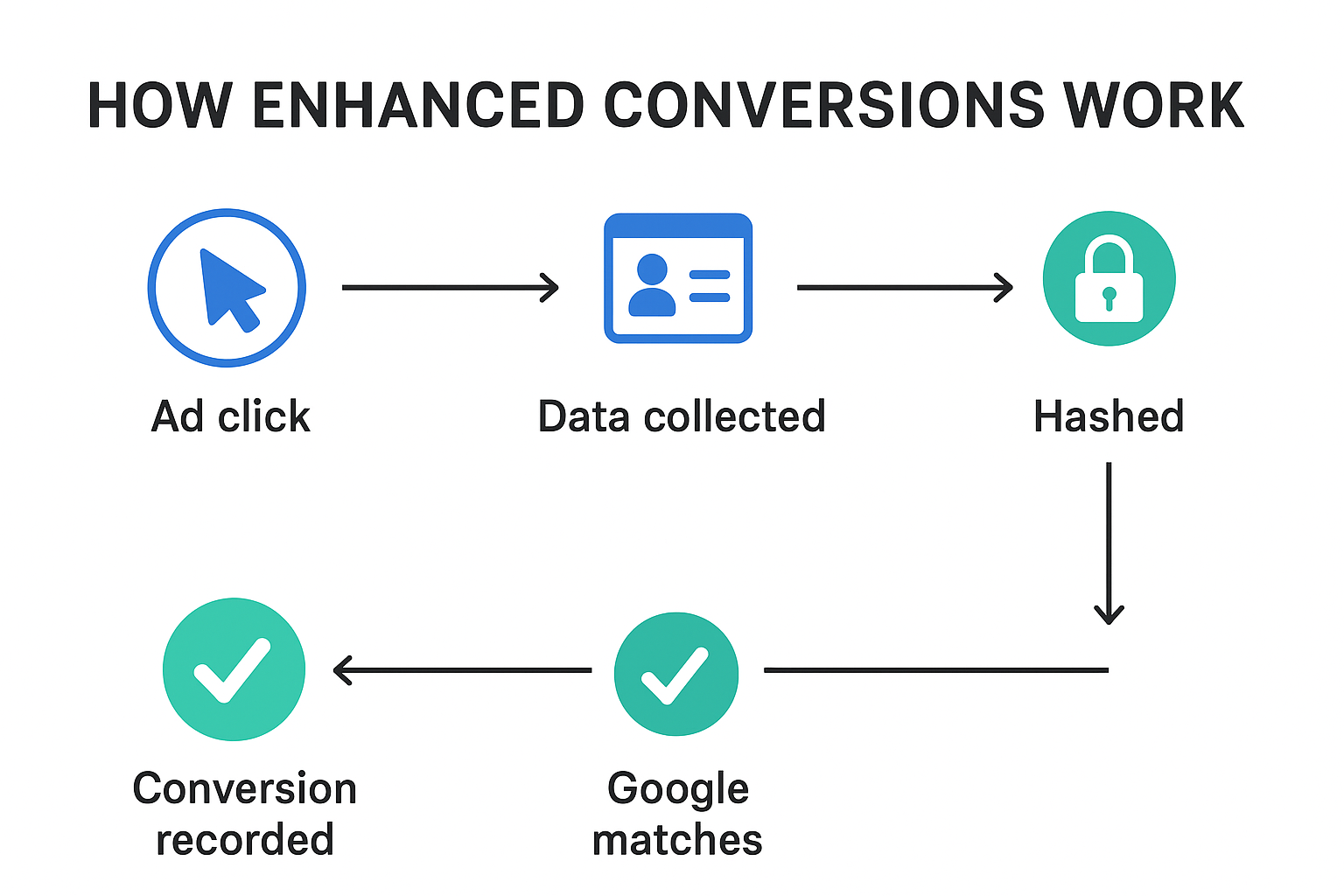
  • The conversion is then logged in your Google Ads account.
7. Benefits
  • The conversion count in Google Ads is more accurate.
  • Smart Bidding strategies (like Target CPA, Target ROAS, or Max Conversions) get better data to optimize campaigns.
  • Even if cookies or ad blockers hide the conversion, Enhanced Conversions helps recover it.
  • The delayed conversions are attributed properly.
  • So campaigns will be able to effectively target cold audiences.
  • The account is better aligned for scaling.
💡 Take away:
  • Without Enhanced Conversions → You see a sale happened, but due to privacy regulated issues your google ads may not be able to connect it back to the ad.
  • With Enhanced Conversions → You can match the sale to the right ad click using the customer’s “secure fingerprint” (hashed data).

anees@oriben

Share With

How ITP and Privacy Features Affect RLSA & Dynamic Remarketing in Google Ads

How ITP and Privacy Features Affect RLSA & Dynamic Remarketing in Google Ads

Online advertising has changed a lot in the last few years. One of the biggest reasons is the growing push for user privacy. Major browsers like Safari, Firefox, and even Google Chrome are introducing tools and restrictions that limit how advertisers can track users.

While this is good news for privacy-conscious users, it creates challenges for advertisers who rely on remarketing — especially RLSA (Remarketing Lists for Search Ads) and Dynamic Remarketing campaigns in Google Ads.

In this article, we’ll explain in detail:

  • How ITP & Privacy features affect RLSA and Dynamic Remarketing
  • How these changes affect your campaign performance
  • And finally, what can you do to overcome this ?

Let’s dive in.

What Are RLSA and Dynamic Remarketing?

Before we get into the challenges, let’s quickly recap how these two campaign types work:

✅ RLSA (Remarketing Lists for Search Ads)

This feature allows you to customize your search campaigns for people who have already visited your website.

Example:

  • Someone visits your online store and checks out a pair of shoes.
  • A few days later, they searched on Google for “best running shoes.”
  • Because they’re on your remarketing list, you can bid higher or show them a more tailored ad than you would for a brand-new user.
✅ Dynamic Remarketing

This takes remarketing a step further. Instead of showing a generic ad, Google uses the products or services the person looked at on your site and shows them personalized ads.

Example:

  • A user browses a red handbag on your site but doesn’t buy it.
  • Later, they see a Google Display Ad featuring that exact red handbag, reminding them to come back and complete the purchase.

👉 Both strategies rely heavily on cookies and tracking tags to recognize the same user when they come back. And this is where ITP comes in.

What Is ITP (Intelligent Tracking Prevention)?

ITP is a privacy feature created by Apple for Safari. Similar protections exist in Firefox (Enhanced Tracking Protection, or ETP) and will soon be fully rolled out in Google Chrome under the Privacy Sandbox initiative.

The goal of ITP is simple:

To stop advertisers and third parties from tracking users across websites for long periods of time.

It does this by:

  1. Limiting how long cookies can last
  • In Safari, first-party cookies created by scripts (like Google Ads tags) often expire in just 7 days or even sooner.
  • Third-party cookies (from ad networks) are blocked entirely.

2. Blocking third-party tracking cookies by default

  • Many remarketing systems need cross-site tracking to work, which becomes impossible.

3. Stripping URL tracking parameters

  • This removes identifiers (like gclid in Google Ads) that help connect a click to a conversion.

4. Preventing trackers from running at all

  • Ad blockers and browser privacy settings can completely block the remarketing tag from loading.

On paper, these sound like small technical details, but the impact on advertising is huge.

How ITP & Privacy Features Technically Affect RLSA and Dynamic Remarketing
🔹 Impact on RLSA (Remarketing Lists for Search Ads)
  1. Shortened Cookie Expiration
  • Normally, Google Ads Remarketing Tags can set a 30-day cookie (or longer) to keep someone in a remarketing list.
  • Under Safari ITP, JavaScript-set first-party cookies expire in just 7 days (sometimes 24 hours if they’re linked to cross-site tracking).
  • This means:
    • Day 1: User visits your site.
    • Day 8: That cookie is already gone — so the user “falls off” your list, even though you set the list duration to 30 days in Google Ads.

2. Blocked Third-Party Cookies

  • If your remarketing tag tries to drop a third-party cookie (from net or googleads.g.doubleclick.net), Safari/Firefox block it instantly.
  • Result: These users are never added to your RLSA list at all.

3. Cross-Device and Cross-Browser Tracking Breaks

  • Without persistent cookies, Google can’t link the same user across mobile + desktop (unless they’re logged into Google).
  • Example: User searches on mobile → visits your site → later searches on laptop. Without login data, Google treats them as two different users.
🔹 Impact on Dynamic Remarketing
  1. Loss of Product-Level Tracking
  • Dynamic remarketing relies on event tags (e.g., view_item, add_to_cart) + product IDs sent via cookies.
  • If cookies are gone:
    • Google Ads receives the visit but can’t tie it to a specific product.
    • Instead of seeing “red handbag you viewed,” the user just sees a generic brand ad.

2. Audience List Shrinkage

  • With 7-day cookies, long buying journeys (like travel, cars, B2B software) suffer most.
  • Example: User browses vacation packages → waits 3 weeks → cookie is expired → they never see your remarketing ads when they’re ready to book.

3. Click Parameter Stripping

  • Safari strips URL identifiers like gclid (Google Click ID) after 24 hours if cookies are considered tracking-related.
  • Without this, Google Ads struggles to connect ad clicks → remarketing tags → conversions.

👉 In short:

  • RLSA lists become smaller and “leak” users quickly.
  • Dynamic Remarketing loses personalization, turning into generic ads.
How to Fix or Reduce These Issues

Now let’s look at the practical steps you can take.

✅ 1. Move to Server-Side Tagging

The problem with client-side tagging (default):

  • Google Ads tags run in the browser.
  • Safari sees them as “trackers” → applies ITP → short cookie lifetime or total block.

Server-side tagging solution:

  • Instead of sending data straight from the browser to Google, the browser sends it to your server/domain first.
  • Example:
    • User visits → browser sends it to https://tracking.yourdomain.com.
    • Your server processes it → forwards it to Google Ads/GA4.

Why this works:

  • Because the cookie is dropped by your own domain, it is considered first-party and not flagged as cross-site tracking.
  • Cookies can last much longer (e.g., 90 days instead of 7).

Tools you can use:

  • Google Tag Manager Server-Side (sGTM) hosted on Google Cloud or your own server.
  • Google Tag Gateway (via Cloudflare) for easier implementation.
✅ 2. Use Enhanced Conversions

The problem: When cookies fail, Google Ads can’t always connect a click → to a conversion → to a remarketing list.

The fix (Enhanced Conversions):

  • Collect first-party identifiers during checkout or lead form submission (like email, phone, or address).
  • Send these values to Google Ads in hashed (encrypted) form.
  • Google then matches these with signed-in Google accounts.

Result: Even if Safari blocks the cookie, Google can still match “John who clicked the ad” with “John who made a purchase.”

✅ 3. Encourage User Sign-Ins

Why this helps:

  • Cookies may fail, but Google can still track users if they’re logged into their Google account (via Gmail, YouTube, Chrome).
  • If you encourage logins (e.g., loyalty programs, gated content, exclusive offers), users are more often signed in → remarketing lists become more accurate.
✅ 4. Adjust Remarketing List Durations

The issue: Safari expires cookies after 7 days.

The solution:

  • Instead of setting remarketing lists for 30–90 days, create shorter lists (e.g., 7–14 days) for Safari/Firefox-heavy audiences.
  • Use “fresher” remarketing windows that capture people while their cookies are still valid.

Example:

  • Instead of “All site visitors (30 days),” create “All site visitors (7 days).”
  • Layer urgency-based messaging like discounts or “low stock” offers to push faster decisions.
✅ 5. Diversify Audience Sources

Since you can’t rely only on cookies anymore:

  • Customer Match → Upload CRM/email lists into Google Ads → remarket to known users.
  • GA4 Audiences → GA4 uses modeling + signals (beyond cookies) to sync audiences into Google Ads.
  • In-App Events → If you have an app, app events feed directly into Google Ads audiences and aren’t affected by browser ITP.

This spreads risk and ensures you’re not over-relying on cookie-based web data.

 Final Takeaway

From a technical perspective, ITP and other privacy features cut off the tracking chain at the cookie level:

  • RLSA loses users when cookies expire early.
  • Dynamic remarketing loses personalization when product-level data isn’t tied to the visitor.

But with server-side tagging, Enhanced Conversions, login strategies, shorter remarketing lists, and diversified audience sources, you can rebuild that chain in a privacy-safe way.

The future of remarketing isn’t about “tracking more” — it’s about tracking smarter with first-party data.

The Bottom Line

Privacy updates like ITP are here to stay. They reduce both the size and accuracy of your remarketing audiences, making it harder to reach past visitors with tailored ads.

To keep RLSA and Dynamic Remarketing working well, you’ll need to adapt — focus on first-party data, invest in server-side tracking, and use multiple audience sources. That way, you can still deliver relevant ads to the right people, even in a more privacy-focused web.

anees@oriben

Share With

How To Use First-Party Data in Customer Match & Enhanced Conversion For Fueling Smart Bidding

How To Use First-Party Data in Customer Match & Enhanced Conversion For Fueling Smart Bidding

Remarketing has always been one of the most powerful tools in digital marketing. It lets you reconnect with people who already know your brand —

For years, remarketing worked by following people around the internet using cookies. But times are changing. Privacy laws are stricter, browsers are phasing out cookies, and users want more control over their data.

This affects the performance of Automated AI powered campaigns and bidding strategies. The RLSA and Dynamic remarketing capabilities make the Pmax and TROAS/TCPA campaigns powerful.

So here we make a plan to use the First Party data in Customer match and Enhanced conversion to fuel the advanced campaign types with the data it was missing from Cookie loss. 

1. Customer Match: Turning First-Party Data Into Audience Power

Customer Match allows you to upload customer details (like email, phone number, or address) into Google Ads so you can create highly valuable audiences.

How to use first-party data in Customer Match:
  1. Upload customer lists
    • Prepare your first-party data (e.g., CRM, purchase history).
      Format it into Google Ads’ accepted CSV template (email, phone, country, zip).
    • Upload in Google Ads → Tools & Settings → Audience Manager → Customer Lists.
    • Google matches them with users logged into their Google account.
      You can then target these people across google
    • In order to power customer match the smart bidding, you need to enable “Smart Bidding and Optimized Targeting” in Customer Match → Account settings

2. Build audience segments
Once Google matches the uploaded data with signed-in Google users, you can:

    • Retarget past buyers with new offers.
    • Exclude existing customers when running acquisition campaigns.
    • Create Similar Audiences (lookalikes) to expand reach.

3. Apply in campaigns

    • Attach these audiences to Search, YouTube, Display, and Discovery campaigns.
      Combine with bid adjustments or let Smart Bidding handle it.
How Google’s Customer Match Algorithm Works with uploaded data
  1. Google “hashes” the data for security.
    • Before uploading, or during upload, the information is encrypted using SHA256 hashing.
    • Hashing converts your customer’s personal info into a string of numbers/letters.
    • Example: customer@example.com → 5f4dcc3b5aa765d61d8327deb882cf99 (hashed form).
    • This way, Google never sees the raw customer data.

  2. Google compares hashed data with its own
    • Google already stores hashed versions of emails, phone numbers, etc., for billions of logged-in users.
    • The system cross-checks your uploaded list against its own database of hashed user info.

  3. When a match is found
    • If the hashed email/phone user uploaded matches the hashed data of a logged-in Google account, that user is added to your Customer Match audience.
    • If no match is found, that record is discarded.
    • After processing, you get an audience list of all matched Google users.
    • These people can then be targeted across Google Search, YouTube, Gmail, and Display Network.

  4. Updating & refreshing
    • Google recommends uploading updated lists regularly. This keeps your Customer Match audience aligned with your real customer base.

💡 Why this matters for bidding:
Customer Match feeds Smart Bidding with audience signals. Google knows these matched users are more valuable, so your bidding strategy can prioritize them automatically.

2. Enhanced Conversions: Feeding More Accurate Conversion Data

Conversions are the signals that Smart Bidding optimizes towards. But if tracking isn’t complete, Smart Bidding is running blind. That’s where Enhanced Conversions comes in.

How to set it up:
  1. Enable Enhanced Conversions in Google Ads → Conversions → Settings.
  2. Pass hashed customer data (email, phone, name/address) through your website tags or Google Tag Manager.
  3. Google uses this data to match conversions more accurately to your ad clicks.
Example:

A user clicks your ad → browses → purchases later via another device. Normally, this may not be attributed. But with Enhanced Conversions, the system uses hashed first-party data (like their email at checkout) to connect the dots and give credit.

💡 Why this matters for bidding:
Enhanced Conversions ensure every possible conversion is tracked and attributed, making Smart Bidding smarter. Instead of missing half the picture, your bidding models are trained on complete and precise data.

3. Smart Bidding: Letting Google Optimize With Better Signals

Smart Bidding strategies like Target CPATarget ROAS, and Maximize Conversions thrive when they receive rich signals.

Here’s how first-party data plays a role:

  • Customer Match audiences → Tell Smart Bidding who is valuable.
  • Enhanced Conversions → Tell Smart Bidding what actions really happened.

Together, they supercharge Google’s machine learning.

Practical ways to use first-party data with Smart Bidding:
  1. Prioritize high-value segments
    Example: Apply Customer Match lists of loyal buyers. Smart Bidding learns these users have higher conversion probability, so it will bid more aggressively when they search again.

  2. Refine conversion value for ROAS
    If you’re running Target ROAS, Enhanced Conversions help ensure higher-value sales aren’t undercounted, letting the bidding system allocate budget more efficiently.

  3. Improve lead quality in CPA campaigns
    For lead gen businesses, Enhanced Conversions for leads (with CRM data) can connect offline sales back to Google Ads clicks. This helps Smart Bidding optimize not just for “form fills,” but for real revenue-generating customers.

Example Workflow Putting It All Together

Let’s imagine an e-commerce brand selling organic spices:

  1. Customer Match
    • Upload past buyers → Target them with new festive offers.
    • Exclude them from generic awareness campaigns.
  2. Enhanced Conversions
    • Pass customer emails from checkout to Google Ads → Track even cross-device purchases.
  3. Smart Bidding
    • Run a Target ROAS campaign.
    • The system learns from accurate sales data (Enhanced Conversions) + high-value buyers (Customer Match).
    • The budget is automatically directed to the best customers at the best bids.

Result will be: More sales at a better ROI, with less wasted spend.

Final Takeaway

By using first-party data in Customer Match and Enhanced Conversions, you give Smart Bidding the right signals to work smarter. Customer Match helps you focus on the most valuable audiences, Enhanced Conversions ensures accurate tracking, and Smart Bidding uses both to optimize your bids automatically. Together, they create a powerful system that drives better results and maximizes your ad spend.

  • Customer Match = Identify and prioritize valuable audiences.
  • Enhanced Conversions = Capture every conversion signal.
  • Smart Bidding = Optimize bids with Google’s machine learning.

The key is not just having first-party data—but using it in the right places inside Google Ads. Do this well, and you’ll give Smart Bidding the best chance to work at full power.